One post tagged with "Conventional Commits"

View All Tags

Merged PR 42: fix(Azure DevOps): Merge PR without prefix in commit message

· 3 min read
Shpend Kelmendi
Software Engineer & Architect

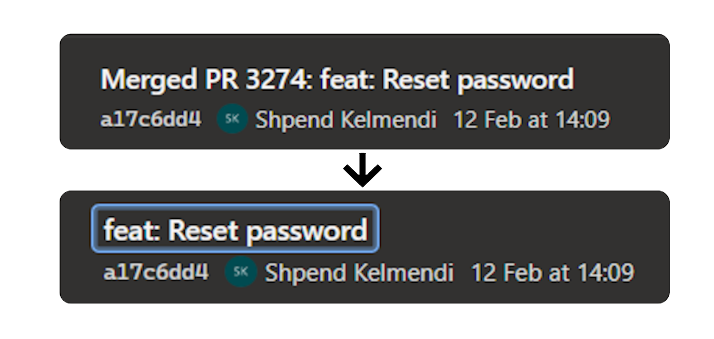
I use Azure DevOps across many customer projects. I really like it. One thing I didn't like is the message added to the beginning of the commit when you closed and merged your PR. You can see it above in the image or in my title. Not so nice to read, right? I agree.

Why is this important?

I like to have a clean commit history.
I like simple git graphs.
And I want to automate chores like deciding whether a new version is a patch, minor, or major increment.
That's why I like to use conventional commits which, enable semantic versioning (SemVer).

Conventional commit is a simple and lightweight convention for your commit messages. Here are some examples of conventional commit types and their impact on versioning:

TypeExampleMeaningVersion Impact
featfeat: login as guest with one-time passcodeNew featureMinor1.0.0 → 1.1.0
fixfix: correct device registration validation logicBug fixPatch1.0.0 → 1.0.1
chorechore: update minor versionMaintenance / small changesPatch or ignored (config dependent)
perfperf: import up to 10 projectsPerformance improvementPatch or ignored (config dependent)
refactor!refactor!: remove deprecated import endpointBreaking change indicated with !Major1.0.0 → 2.0.0

If you need support writing conventional commits, try out commitizen.

The "Merged PR NUMBER" prefix added by Azure DevOps after merging a PR is not helpful. So how can we fix this? Let's check our options.

Options for conventional commits

I know three options when you want to use conventional commits with Azure DevOps.

Manually

You can change the commit message by:

  1. Click on the complete button in your PR.
  2. Click "Customize merge commit message".
  3. Replace the commit message.
Manually change the commit message when merging a PR in Azure DevOps

But this is not a reliable way in a team. That's why this solution didn't work for our team, and we would not recommend it.

Workaround: Custom Script

That's why we searched for alternatives. If you just want the commit history to be created correctly, John Reilly describes an alternative approach in his blog post, using the Azure DevOps API, Node.js, and TypeScript. He wrote a tool that uses the autocomplete feature to override the commit message before merging the PR.
So basically, what you have seen in the previous chapter by doing it manually.

Disable prefix in Azure DevOps Settings (New)

This problem was seen and reported in October 2018:

Feature request to disable or change the default commit message when merging a PR in Azure DevOps, created in 2018

After endless complaints and a long waiting time, this feature has been implemented and released (5. March). You can disable the prefix message by:

  • Go to Project Settings
  • Select Repos → Repositories
  • Select a Repository
  • Disable "Include PR ID in the completion commit message title by default."

If you don't see this, you need to wait a few more weeks until this feature is available for you, too.

Conclusion

Based on the feedback it's not only me, struggling with this design decision. So thanks to the team who took the time to realise this. The feature is limited by disabling it per project or repository. You can not set this globally for all repositories in an organization.

Further Reading