3 posts tagged with "Azure DevOps"

View All Tags

Release Management in Azure DevOps: A Comparison of Options, Common Anti-Patterns, and Practical Combinations

· 15 min read
Vanesco Böhm
Software Engineer

Azure DevOps has no built-in Release work item type — and the gap has at least six different solutions, each borrowed from a feature built for something else.

Every team shipping software eventually needs to answer the same questions: which stories are going into Release 2.5? Which might slip to 2.6? Can a story belong to both? Who can see this during sprint planning, and who can report on it afterward? The answer depends entirely on which mechanism you reach for — and the trade-offs between them are real and non-obvious.

This article walks through each option using a consistent example: a development team preparing Release 2.5, with a handful of stories that might partially deliver in 2.5 and complete in 2.6, and a product owner who needs release membership visible during sprint reviews and in progress reports.
What You Are Really Choosing Between

Before comparing options, it is worth naming the dimensions that separate them, since they determine which questions each option can and cannot answer.

Multi-release assignment. Can a single work item belong to two releases simultaneously? This matters whenever stories span release boundaries — a feature that ships partially in 2.5 and completes in 2.6 needs to appear in scope for both.

Governed enumeration. Are the allowed release values controlled by an administrator, or can anyone type anything? Free-form values accumulate variants (release-2.5, Release 2.5, R2.5) that silently break filters and reports.

Visibility in sprint context. Can team members see release membership on the sprint board or sprint backlog, or does checking require opening a separate query? This gap affects daily usability during sprint execution.

Metadata on the release itself. Does the release have its own form — with fields for target date, owner, deployment checklist, and status — or is it just a label attached to individual work items?

Planning versus traceability. Some options answer "what do we plan to ship?" — useful upfront, during sprint planning and roadmap reviews. Others answer "what did we actually ship?" — useful retrospectively, for audit trails and release notes. These are different questions that call for different tools.


Feature or Epic as Release Container

Features in Azure DevOps are designed to represent discrete, shippable capabilities — a meaningful piece of functionality that can be planned, tracked, and delivered independently. The canonical uses are grouping stories under a single deliverable: "Implement SSO login", "Redesign checkout flow", "Add PDF export". Epics sit one level above, representing large initiatives that span multiple features and potentially multiple releases.

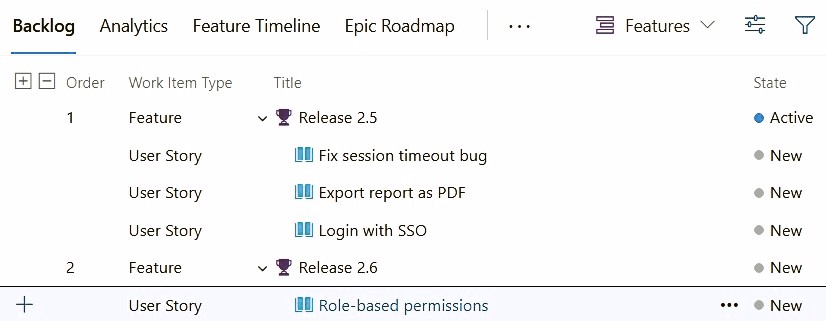
For release management, a Feature can be repurposed as the release container itself. Create a Feature titled "Release 2.5" and assign User Stories as its children using the standard parent-child link:

Epic:     "Product v2"

├── Feature: "Release 2.5"
│ ├── Story: "Login with SSO"
│ ├── Story: "Export report as PDF"
│ └── Story: "Fix session timeout bug"

└── Feature: "Release 2.6"
└── Story: "Role-based permissions"
The backlog's UI can be convenient when using features for release management.

This requires zero configuration. The Feature form provides release metadata immediately: description, start and end dates, an assigned owner, acceptance criteria, and comments. Sprint backlog views show the parent Feature name when "Show parents" is enabled. Delivery Plans treats Features as first-class timeline items, making cross-team release scope visible with no additional setup.

The structural constraint is fundamental: parent-child in Azure DevOps is a tree. A Story can have exactly one parent Feature. If "Role-based permissions" ships partially in 2.5 and completes in 2.6, there is no clean way to express that — the story must either be split or assigned to one release with the inaccuracy accepted.

The second problem is scope pollution. If Features are already used to represent product capabilities ("Implement SSO", "Redesign checkout"), adding a "Release 2.5" Feature alongside them contaminates the Feature backlog with logistics items. Portfolio views and feature-level burndowns become harder to interpret when release containers and product features share the same list.

When to reach for it: Features are not yet used for product capability tracking, multi-release assignment is an edge case rather than a regular need, and the team wants release metadata and Delivery Plans integration with no configuration cost.


Custom Work Item Type

Custom Work Item Types (WIT) exist to model domain entities that have no natural fit among the standard types. The inherited process model allows organizations to define types specific to their workflow: an Impediment WIT for blockers that need their own lifecycle, a Risk WIT for regulated project risk registers, a Change Request WIT for formal change control boards. The common pattern is an entity with its own form, workflow states, and relationships — something that is neither a Story, Bug, Task, Feature, nor Epic.

A "Release" work item type follows the same pattern. Define the type with the fields the team actually needs — version number, target date, release owner, deployment checklist, release notes — and a workflow that reflects the release lifecycle:

Release WIT: "Release 2.5"
├── Version: 2.5
├── Target Date: 2026-06-15
├── Owner: Jane Smith
├── State: Active
└── Links (Related):
← Story: "Login with SSO"
← Story: "Export report as PDF"
← Story: "Fix session timeout bug"
← Story: "Role-based permissions" ← also linked to Release 2.6
Stories can be linked as related when using a custom work item type for release planning.

The key advantage over using a Feature as the release container is that a Story can be linked to multiple Release work items simultaneously. The Related link type uses a many-to-many topology — there is no parent-child tree constraint. "Role-based permissions" can appear under both Release 2.5 and Release 2.6 without splitting the story. There is also no conflict with existing Features: releases live as a separate type with their own backlog view.

The cost is visibility. Links between a Story and a Release WIT do not surface as a filter option in the sprint board or sprint backlog. Sprint board filters operate on iteration path and area path — not on linked work item types. This is an architectural limitation of the product, not a configuration gap. Seeing release membership in sprint context requires a dedicated query ("all items in Sprint 22 with a Related link to Release 2.5"), not a board toggle.

Setup requires organization-level process customization. If the project already uses an inherited process, the Custom WIT is added directly to it — no project migration needed. If the project is on a base system process (Agile, Scrum, CMMI), a process administrator first creates an inherited variant, adds the type and its fields, then changes the project to use it — a one-time configuration change that leaves all existing work items intact. Either way, the change is scoped to the process template, not the project alone: every other project sharing that template also gains the new type, which makes this an organization-level decision rather than a local one.

When to reach for it: The team needs a first-class Release entity with its own lifecycle, metadata, and accountability. Features are already occupied with product meaning. Multi-release assignment is a regular operational need. The team is willing to use saved queries for release-based filtering rather than a live board toggle.


Tags

Tags are designed for lightweight, informal, ad-hoc labeling that doesn't justify a dedicated field or hierarchy. Their natural territory is disposable signals: blocked, customer-reported, tech-debt, needs-ux-review, quick-win. The value is low friction — no schema, no approval, no process administrator required. Apply a tag, filter by it, remove it when it is no longer useful.

For release management, tags like release-2.5 and release-2.6 provide multi-release assignment with zero configuration. A story carries both tags when it spans release boundaries. Tags are available as filters in backlog views, Kanban boards, and Delivery Plans natively.

The problem is governance — and it compounds over time. Tags are free-form and unconstrained across the entire project. Release 2.5, release-2.5, R2.5, and rel_2.5 are four distinct tags with no relationship to each other. There is no approval step, no deduplication, and no enforcement. A naming convention established in January will have accumulated variants by April in any team larger than a handful of people.

Tags can be tempting to use because of their simplicity and versatility.

Tags carry no metadata. A tag is a string — there is no release date, owner, description, or status attached to it. Reporting is also constrained: query-based charts cannot group results by tag; only the "Chart for Work Items" dashboard widget supports tag grouping, and Analytics queries require additional workarounds to use tags cleanly. Sprint burndown and velocity charts have no awareness of tags at all.

When to reach for it: The team is small enough that naming discipline can substitute for governance, multi-release assignment is needed, zero configuration overhead is the priority, and the long-term maintenance risk is consciously accepted. Tags are also a reasonable fallback when multi-release assignment is needed but a Marketplace extension cannot be approved.


Custom Field — Single-Value Picklist

Custom picklist fields capture structured, governed, single-value metadata directly on a work item. The natural uses are attributes that belong to the item and need to be consistent and reportable across the team: "Affected Component" (API, Frontend, Database), "Business Domain" (Payments, Identity, Reporting), "Environment" (Production, Staging, On-Prem), "Effort Category" (S/M/L/XL as a complement to story points). The value of a picklist over a free-text field is enumeration control — only listed values can be selected, keeping the data clean enough to group and aggregate in reports.

For release management, a "Target Release" picklist field on User Stories and Bugs gives every item a governed, single-value release label:

User Story: "Login with SSO"
├── Iteration Path: Sprint 22
├── Area Path: MyOrg\Team Alpha
├── Target Release: 2.5 ← custom picklist field
└── Story Points: 5
Custom fields with release information can be directly visible on story cards in the sprint Taskboard.

The field can be used as a filter criterion in Delivery Plans via its field criteria settings, and works natively with Analytics, Power BI, and query-based charts. Grouping by a clean categorical field requires no text-splitting workarounds. Neither the standard backlog filter toolbar nor the sprint board exposes custom fields: seeing release membership during sprint execution requires a saved query rather than a UI toggle, which is a genuine daily-use gap that teams should factor in before choosing this option.

The other constraint is cardinality. A story holds one release value at a time. When a story spans two releases, teams typically split it, update the value when scope shifts, or accept a temporary inaccuracy. For most teams this is a minor operational trade-off; for teams where multi-release assignment is frequent, it becomes a recurring friction point.

Adding or removing release values from the picklist requires a process administrator — a light governance step, but a real dependency on the right person having the right permissions.

When to reach for it: Single-value assignment covers the team's common cases, reporting and analytics on release scope matter, and the team is comfortable with a saved query to surface release membership in sprint context. This is the lowest-friction governed option with no extension dependency.


Custom Field — Multi-Value Picklist Extension

Azure DevOps has no native multi-value picklist field. Marketplace extensions fill this gap by adding a custom UI control backed by a text field in the inherited process. The natural uses are situations where the single-value constraint genuinely misrepresents the data: "Affected Components" (a bug that touches both the API and the frontend), "Compliance Standards" (a story that must satisfy both ISO 27001 and SOC 2), "Customer Segments" (a feature targeting both Enterprise and SMB users).

For release management, the extension lets a story carry both "Release 2.5" and "Release 2.6" from a governed list, displayed as a multi-select dropdown or checkbox group directly in the work item form. The most widely used extension is published by Microsoft DevLabs and is open-source:

A cascading variant also exists for teams where a parent field (e.g., Product) constrains which child values (e.g., Release) are available:

Under the hood, selected values are stored as a semicolon-delimited string in the backing field:

Target Release:  2.5;2.6

This storage model has downstream consequences. Queries use "Contains" semantics rather than exact match, which can produce false positives when release names are substrings of each other — a query for "Contains '2.5'" also matches "2.50" or "12.5". Power BI and Analytics reports require text-splitting logic rather than a clean categorical join, which adds meaningful complexity for teams with serious reporting requirements.

Like the single-value picklist, the field is not available as a filter in the sprint board view, and the standard backlog filter toolbar does not expose it either. In Delivery Plans field criteria and saved queries, filtering uses "Contains" semantics rather than exact match.

The other consideration is organizational: extensions require admin approval and org-level installation. If the extension is abandoned or breaks on a future Azure DevOps update, the control degrades to a plain text field — the stored values remain, but the governed multi-select picker disappears until the extension is restored or replaced.

When to reach for it: Multi-release assignment is a genuine operational need rather than an edge case, the organization can approve a Marketplace extension, and the team can accept the reporting complexity that comes with a delimited string backing field.


Iteration Paths

Iteration paths are the time axis of Azure Boards. Their job is to answer exactly one question: when is this work scheduled? Every sprint-facing feature in Azure DevOps — the sprint board, sprint backlog, burndown chart, velocity chart, capacity planning, and the @CurrentIteration query macro — is built around iteration paths as time periods with start and end dates. Their natural use is sprint scheduling: "Sprint 22" runs May 4–17, "Sprint 23" follows, and work items move through them.

It is technically possible to use iteration paths as release containers by adding a release level as parent nodes:

MyOrg
├── Release 2.4
│ ├── Release 2.4\Sprint 1
│ └── Release 2.4\Sprint 2
└── Release 2.5
├── Release 2.5\Sprint 1
└── Release 2.5\Sprint 2

The appeal is zero configuration and a native hierarchical rollup: selecting "Release 2.5" in the iteration picker shows all work across both of its sprints. The sprint board, backlog, and burndown all function as normal under each leaf sprint node.

The problem is that this structure conflates two independent questions — when? and which release? — into a single field. Sprint velocity and burndown charts assume iterations are uniform time boxes; the addition of parent release nodes distorts these calculations. If a story moves from Release 2.5 to 2.6, its iteration path must be updated on every affected work item. Teams running continuous delivery on a fixed sprint cadence — which is the norm — will find that the release hierarchy fights the natural shape of their sprint schedule.

There is also no release metadata: iteration nodes have a name and dates, and nothing else.

Microsoft's documentation consistently recommends treating iteration paths as time periods and using other mechanisms — features, area paths, or custom fields — for release scope categorization. The iteration path hierarchy pattern as described in my article on Azure DevOps project structure shows a legitimate use of nested iteration nodes; encoding release versions there is not it.

When to reach for it: Essentially never as a primary release categorization strategy. The rollup view is convenient, but the conceptual debt accumulates quickly as soon as velocity, burndown, or capacity data is needed.


Complementary Tools

Two Azure DevOps features are worth knowing about in a release management context, though they serve different roles than the options above — they work on top of whichever categorization approach is chosen, rather than providing categorization themselves.

Delivery Plans provides a cross-team timeline view of Features, Epics, or Stories across sprints. It does not assign work items to releases; it visualizes the assignments already in place. Once release scope is established via any of the options above, Delivery Plans surfaces it as a horizontal timeline with milestone markers (release dates, code freeze, deployment windows), dependency arrows between work items, and a side-by-side view of what multiple teams are working on in each sprint. It is most useful when release scope needs to be communicated across teams or to stakeholders who want a roadmap view rather than a backlog list.

Pipeline-driven release links answer a different question entirely: not "what do we plan to ship?" but "what did we actually ship?" When Azure Pipelines deploys a build, it automatically traces the included commits back to linked work items and creates Integrated in build and Integrated in release stage links. The result is an automatically maintained audit trail — from requirement to commit to build to production — without any manual data entry. This is valuable for compliance, incident response, and generating accurate release notes after the fact. It cannot substitute for a planning-time categorization approach: the links only exist after deployment has occurred.

Teams in regulated industries or those with strong traceability requirements often layer pipeline-driven links on top of one of the planning options above, covering both the prospective and retrospective questions with different tools.


Comparison

All options compared across the dimensions that matter for release management. Delivery Plans and pipeline-driven links are excluded — they are not categorization alternatives but complementary tools described in the section above. A (+) indicates a strength, a (−) a weakness, and (+/−) a trade-off or context-dependent characteristic.

Feature / EpicCustom WITTagsCustom PicklistMulti-Value PicklistIteration Path
Original purposeGroup stories into shippable capabilitiesDomain entities with their own lifecycleAd-hoc, informal labelsGoverned single-value metadataGoverned multi-value metadataSprint / time scheduling
Multi-release assignmentOne parent only (-)Via Related links (+)Many tags per item (+)Single value (-)Multiple values (+)Single iteration (-)
Governed valuesName only (+/-)Name only (+/-)Free-form (-)Enumerated picklist (+)Enumerated via extension (+)Defined by admin (+)
Backlog / Delivery Plans filterVia parent hierarchy (+)Requires saved query (-)Native (+)Delivery Plans only; saved query for backlog (-)Delivery Plans only, "Contains"; saved query for backlog (-)Native (+)
Sprint board visibility"Show parents" only (+/-)Not available (-)Native filter; hides parent grouping (+)Not available (-)Not available (-)Native (+)
Release has own metadataDates, owner, description (+)Full custom form (+)String only (-)String only (-)String only (-)Dates & name only (+/-)
Release has own workflowInherits WIT states (+)Custom states (+)No (-)No (-)No (-)No (-)
Analytics / Power BIHierarchy rollup (+)Via linked-item queries (+/-)Dashboard widget only; burndown/velocity unaware (-)Clean categorical field (+)Needs text-split logic (+/-)Works, conflates time & scope (+/-)
Setup complexityNone (+)Medium; affects all projects on process template (-)None (+)Low; admin needed to add/change values (+/-)Low; requires extension; admin needed to add/change values (-)None (+)
Extension requiredNo (+)No (+)No (+)No (+)Yes - degrades to plain text if abandoned (-)No (+)
Conflicts with standard usageIf Features are already in use (+/-)No conflict (+)No conflict (+)No conflict (+)No conflict (+)Conflates time & scope (+/-)

Decision Guide

Use tags if the team needs a quick release label, is small, and can enforce a naming convention by discipline. Zero configuration, multi-release assignment. Accept the governance risk consciously.

Choose a custom picklist field if single-value release assignment covers most cases and release scope reporting matters. Clean categorical data, governed enumeration, works natively with Analytics and Power BI. Use saved queries to surface release membership in sprint context.

Use a multi-value picklist extension if stories genuinely span two releases, governance matters and a Marketplace extension can be approved. If not, use tags with a strict naming convention as a conscious fallback.

Choose Custom WIT when the team needs a Release entity with its own lifecycle — target date, owner, release notes, workflow states. Accept that release membership is surfaced via queries rather than inline board filters.

Custom WIT and custom picklist fields are alternatives when Features are already used for product capabilities and cannot be repurposed. The choice between them depends on whether release metadata and multi-release assignment are required.

Use Features/Epics as release containers when they are free to use and when the team wants cross-team release planning in Delivery Plans. This pairs naturally with Delivery Plans for timeline visualization with no additional configuration.

When audit-quality traceability is required, add pipeline-driven links on top of whichever planning option is in use to track what shipped in each build, when it deployed, and to which environment.


Anti-Patterns

Using tags as the primary release categorization as the team or codebase grows. Naming drift is slow but inevitable; a governance problem that starts small rarely solves itself.

Using iteration paths as release containers. The moment sprint velocity, capacity planning, or burndown data matters — which is almost always — the time-and-scope conflation becomes a liability that is expensive to undo.

Using Features as release containers when Features already carry product meaning. The result is a Feature backlog that mixes "Redesign checkout" with "Release 2.5" with no structural separation between them.

Treating Delivery Plans or pipeline-driven links as a substitute for explicit release categorization. Delivery Plans visualizes assignments; pipeline links record what shipped. Neither answers "which stories are planned for Release 2.5?" before the release happens.


Combining Approaches

No single option covers every need. Teams that want clean backlog filtering, multi-release assignment, formal release governance, and audit traceability will find that two or three options working together answer more questions than any one does alone.

A practical combination: a custom picklist field for lightweight, query-accessible release labeling on individual work items; a Custom WIT for formal release records with their own metadata, lifecycle, and accountability; and pipeline-driven links for automatic post-deployment traceability. Delivery Plans rounds out the picture for cross-team release scope visualization. The cost is onboarding complexity — new team members need to understand which layer serves which purpose, and that understanding needs to be written down somewhere.

The guiding principle is to add mechanisms only when a real need demands it. Start with the simplest option that fits the team's actual questions. Add a second layer when the first stops answering them.


Conclusion

Azure DevOps offers no purpose-built release management layer — every approach described here borrows a mechanism designed for something else. Understanding what each mechanism was originally built for is the most reliable guide to where it serves well and where it will fight you. Features work as release containers only when they are not already product features. Iteration paths work for release grouping only when they are not also sprint schedules. Tags work for release labeling only when governance is not a concern. Custom fields and custom work item types require upfront setup but stay out of each other's way.

The practical starting point is to identify which question the team most needs to answer. If it is "what is planned for this release?" and single-value assignment is sufficient, a governed picklist field is the simplest path. If the team needs to track stories that span two releases, an extension or a custom WIT becomes warranted. If a release is a first-class entity in the team's process — with its own owner, lifecycle, and accountability — a Custom WIT is the right investment.

The mechanisms described here are not mutually exclusive. The most complete setups combine a field for quick filtering with a WIT for formal records and pipeline links for retrospective accuracy — each answering its own question, none asked to do double duty.


Further Reading

Designing Azure DevOps Projects for Real-World Complexity

· 8 min read
Vanesco Böhm
Software Engineer

The most consequential Azure DevOps configuration decision you make is also the easiest to get wrong: how to structure your project. Microsoft's default guidance is clear — start with one project and scale using Teams, Area Paths, and Iteration Paths. This guide walks through three scenarios of increasing complexity, including a concrete, tested solution for the hardest case: multiple teams sharing work across multiple products. It also covers the narrow set of situations where a second project genuinely makes sense.


Core Building Blocks

Before walking through scenarios, it helps to understand the four mechanisms that control visibility and ownership in Azure DevOps.

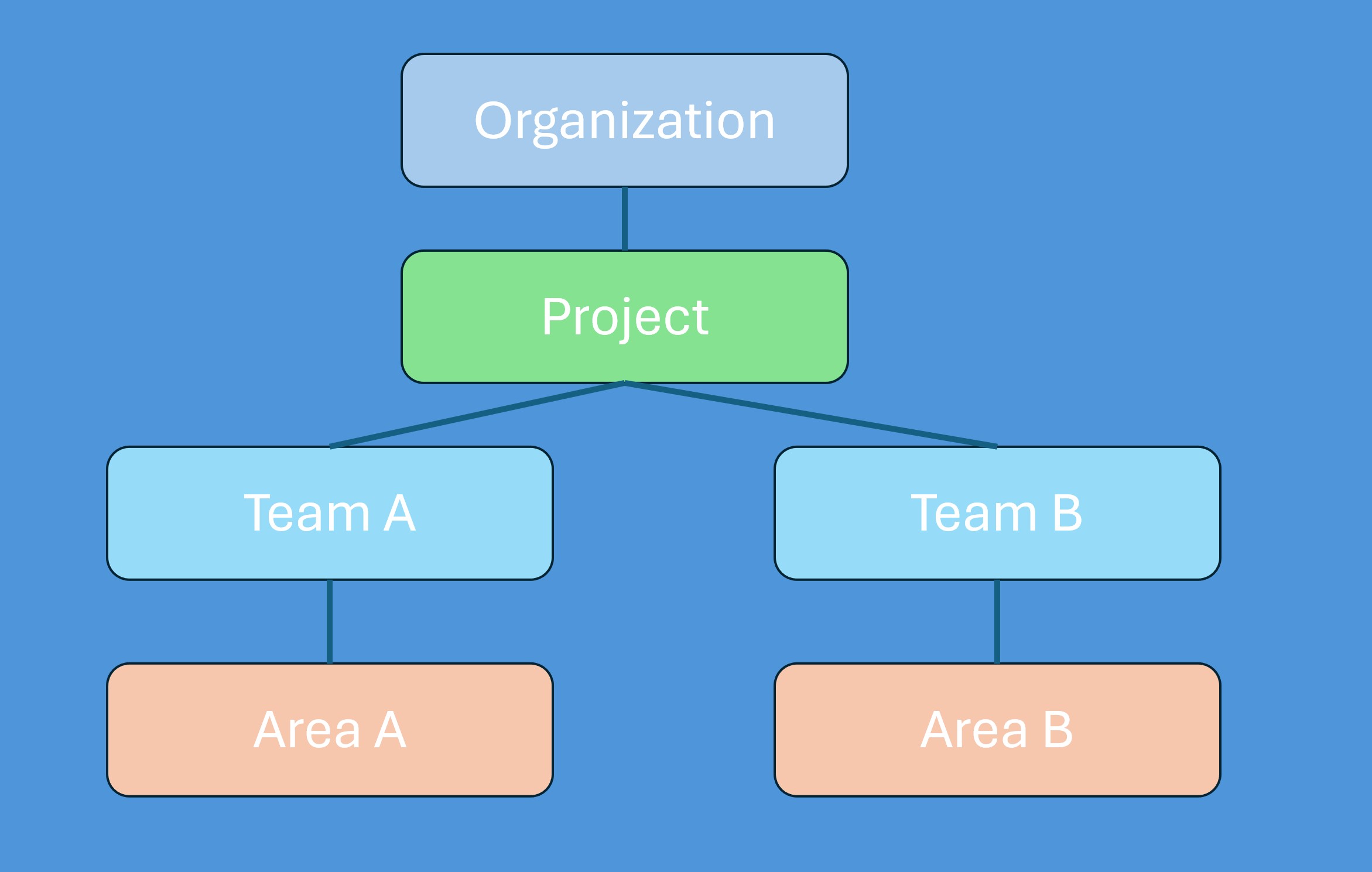
Organizations and Projects form the outer structure. An organization is your top-level namespace (e.g., dev.azure.com/your-company); a project contains all work items, repositories, pipelines, boards, and wikis. For the overwhelming majority of teams, one project per company or product group is the right default. Multiple projects in the same organization are possible but introduce real trade-offs, covered briefly at the end of this article.

Teams are configurable views into the project's shared work item pool. When you create a team, Azure DevOps automatically provisions a backlog, Kanban board, sprint view, and dashboard for it. A team does not own work items — it filters them. This distinction shapes every configuration decision that follows.

Area Paths are hierarchical labels that define what a work item belongs to. Teams are assigned to one or more area paths, and only work items with a matching area path appear on that team's backlog and board. The golden rule for Kanban boards: each work item should appear on exactly one team's board. Assigning overlapping area paths to multiple teams causes silent conflicts in the board column state fields (Board Column, Board Column Done, Board Lane).

Iteration Paths are hierarchical time periods — sprints, releases, or program increments. They are defined at the project level and shared across all teams. Each team independently selects which iteration nodes are "active" for its own sprint view, so two teams can share a project-level sprint definition while operating independently.


Scenario 1: One Team, One Product

The simplest configuration. One project, one team (the default team Azure DevOps creates automatically), and minimal area path structure.

Project: Fabrikam

├── Area Paths: Fabrikam (root node — no sub-areas needed yet)

└── Iterations: Fabrikam\Sprint 1
Fabrikam\Sprint 2
Fabrikam\Sprint 3

The default team is assigned to the root area path and selects sprints as they become active. The backlog shows all work items; the sprint board shows items assigned to the current iteration. No further configuration is needed.

This minimal setup is intentional. Add structure only when a real boundary demands it — premature hierarchy creates administrative overhead without adding value. When the team grows beyond 8–10 people or a second workstream appears, revisit the structure. Until then, keep it flat.


Scenario 2: Multiple Teams, One Product

When a single product grows beyond one team, you create additional Azure DevOps Teams and use Area Paths to reflect ownership. Each delivery team gets its own leaf-node area path. Iterations remain shared across all teams.

Area Path structure:
Fabrikam ← Management team (Include sub-areas: ON)
├── Fabrikam\Team Alpha ← Team Alpha (assigned to this node only)
├── Fabrikam\Team Beta ← Team Beta (assigned to this node only)
└── Fabrikam\Team Gamma ← Team Gamma (assigned to this node only)

Iteration structure (shared by all teams):
Fabrikam\Sprint 1
Fabrikam\Sprint 2
Fabrikam\Sprint 3

Delivery teams are assigned exclusively to their own leaf-node area path. The management or portfolio team is assigned to the root Fabrikam with "Include sub-areas" enabled, giving it rollup visibility across all delivery teams without claiming ownership of their boards.

During sprint planning, Epics and Features are created at the root area path and then assigned to a delivery team by changing the area path to that team's node. Delivery teams break Features into User Stories and Tasks within their own area path. All teams share the same sprint definitions — each team independently marks which sprints are active in its settings.

The Delivery Plans widget rounds out this scenario by providing a cross-team calendar view, showing all teams' work across sprints on a single timeline. This is invaluable for spotting dependencies and aligning delivery milestones without requiring a separate planning tool.


Scenario 3: Multiple Teams, Multiple Products

This scenario introduces a second dimension of complexity: separating product ownership from team responsibility.

This is where standard Azure DevOps guidance becomes less prescriptive. The challenge: multiple teams need to work across multiple products, individual engineers may pick up stories from any product, and some teams — like a shared testing or platform team — span all products. A simple area-path-per-team model breaks down here because it conflates team ownership with product ownership.

Why mixing teams and products in area paths fails

If area paths carry both product and team identity (e.g., Product A\Team Alpha), you end up with a combinatorial explosion of nodes. A cross-product testing team needs either its own parallel branch or overlapping assignments. Worse, a story that starts with Team Alpha and gets reassigned to Team Beta must move between area paths — losing its product association in the process.

Tested solution: area paths for products, subiterations for teams

One proven approach separates product ownership from team responsibility:

  • Area Paths represent products. A work item's area path tells you which product it belongs to, not which team is working on it.
  • Subiterations represent team assignment within a sprint. Each sprint node in the iteration hierarchy contains one child node per team. A work item's iteration path tells you both which sprint it belongs to and which team is responsible for it in that sprint.
Area Path structure:
MyOrg ← Portfolio team (Include sub-areas: ON)
├── MyOrg\Product A
├── MyOrg\Product B
└── MyOrg\Product C

Iteration structure:
MyOrg\Sprint 1
├── MyOrg\Sprint 1\Team Alpha
├── MyOrg\Sprint 1\Team Beta
└── MyOrg\Sprint 1\Testing
MyOrg\Sprint 2
├── MyOrg\Sprint 2\Team Alpha
├── MyOrg\Sprint 2\Team Beta
└── MyOrg\Sprint 2\Testing

Each Azure DevOps Team is configured as follows:

  • Area path assignments: all product area paths (so the team's backlog shows work across all products, filterable by area path)
  • Backlog Iteration: the project root (MyOrg), so all unscheduled work is visible in the product backlog
  • Selected (active) iterations: only the team's own subiteration nodes (e.g., Sprint 1\Team Alpha, Sprint 2\Team Alpha)

The result: a team's sprint board displays only work items whose iteration path falls under their subiteration, regardless of which product area path those items carry. Two dimensions — product and team — are tracked independently without either polluting the other.

Assigning work items

A User Story for Product A owned by Team Alpha in Sprint 1:

Area Path:      MyOrg\Product A
Iteration Path: MyOrg\Sprint 1\Team Alpha

A testing task that touches Product B, handled by the Testing team in Sprint 2:

Area Path:      MyOrg\Product B
Iteration Path: MyOrg\Sprint 2\Testing

The Testing team's sprint board shows all items in Sprint 2\Testing across every product area path — precisely the cross-product view they need, with no board column conflicts.

Assignment can be made at the Story level (the whole story goes to a team's subiteration) or at the Task level (the parent story stays at the sprint root while individual tasks go to different teams' subiterations). The task-level variant supports stories that require contributions from multiple teams within the same sprint.

Trade-offs

  • Iteration management overhead The operational cost is subiteration maintenance: for each new sprint, you create one child node per team. With four teams and two-week sprints, that amounts to roughly 100 iteration nodes per year. This is manageable with a consistent naming convention (Sprint NN — [Team Name]) and can be automated via the Azure DevOps REST API for teams that want to script sprint setup.

  • Reporting challenges
    Built-in analytics (e.g., velocity, burndown) assume iterations represent time rather than team ownership.

  • Increased configuration effort
    Teams must continuously maintain iteration settings.

  • Onboarding complexity
    The model is less intuitive for new team members unfamiliar with Azure DevOps internals.

This makes the approach best suited for organizations where cross-product collaboration is the norm rather than the exception.

Alternative

An alternative is to keep the standard model:

  • Area Paths represent teams
  • Iteration Paths represent time only

Cross-product collaboration is handled through:

  • shared Epics and Features
  • Delivery Plans for cross-team visibility
  • queries and dashboards
  • optional tagging or custom fields for product classification

This approach is simpler and aligns more closely with Azure DevOps defaults, but becomes limiting when teams frequently switch between products or when shared teams operate across all products.


When Multiple Projects Make Sense

The single-project model handles almost every scenario. A second project is worth the trade-offs in exactly three cases:

Different process templates. Process templates are per-project. If one product runs Scrum and another requires CMMI (common in regulated industries), they cannot share a project.

Hard security boundaries. Area path permissions restrict visibility at a granular level, but project membership still grants broad default access. For strict client data separation — GDPR compliance, regulated financial data, defense contracts — project-level isolation provides a stronger boundary. Note that the "Limit user visibility and collaboration to specific projects" preview feature, combined with the Project-Scoped Users group, can partially address GDPR concerns around guest user exposure within a single organization.

Public projects. If one project needs to be publicly accessible (open source work, community feedback), it must be isolated from internal projects.

Cross-project trade-offs to understand before creating a second project: cross-project queries cannot follow link chains, capacity planning does not span projects, and most dashboard widgets do not support cross-project teams (though Delivery Plans does). Every additional project introduces administrative duplication and reduces native observability across the organization.


Anti-Patterns to Avoid

Overlapping area path assignments on Kanban boards. When two teams are assigned to the same area path with "Include sub-areas" enabled, the Board Column and Board Lane fields on shared work items reflect the team that last updated them. Keep area path assignments exclusive at the leaf level for any team that uses a Kanban board.

Not setting dates on iteration paths. Burndown charts, Delivery Plans, and the @CurrentIteration query macro all depend on start and finish dates being set on iteration nodes. Creating sprints without dates silently breaks these features from the start.

Using tags as primary categorization. Tags are convenient but ungoverned: there is no approval workflow, no hierarchy, and no built-in way to delete them. While extensions can help manage tags, they introduce a dependency on non-native tooling. Prefer area paths for product ownership and custom picklist fields for structured reporting. Reserve tags for lightweight, informal labels like "blocked" or "customer-reported."

Setting the backlog iteration too narrowly. If a team's Backlog Iteration is set to a specific sprint rather than the root node, unscheduled product backlog items disappear from the team's backlog view. Always set the backlog iteration to the highest relevant ancestor node.

Creating subiterations but not updating team iteration settings. When you add a new subiteration, each team must go to Project Settings → [Team] → Iterations and mark it as active. This is a common operational mistake with the subiteration pattern and easy to overlook during sprint kickoff.


Conclusion

Azure DevOps project structure rewards deliberate, incremental setup. Start with the simplest configuration that fits your team, and add structure only when a real boundary demands it.

For the hard case — multiple teams sharing work across multiple products — the combination of product-based area paths and team-based subiterations provides clean separation without sacrificing cross-team visibility. The cost is per-sprint iteration node creation; the benefit is that every work item carries two independent dimensions of context (product and team) without conflating them in a single field.

However, if teams are stable and aligned to specific products, cross-product work is limited, or reporting simplicity is a priority, the standard model with team-based area paths remains the better choice.

The architectural principle behind all three scenarios is the same: teams are views, not containers. A team is a configured lens that filters the project's shared work item pool through area path assignments and iteration selections. Understanding this makes every configuration decision a deliberate choice about what each team needs to see — rather than a structural wall between teams.


Further Reading

Merged PR 42: fix(Azure DevOps): Merge PR without prefix in commit message

· 3 min read
Shpend Kelmendi
Software Engineer & Architect

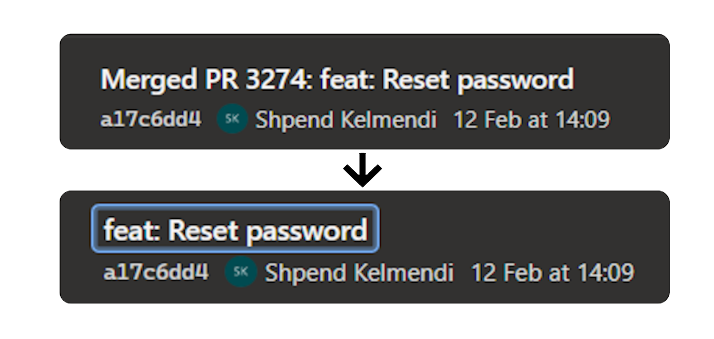
I use Azure DevOps across many customer projects. I really like it. One thing I didn't like is the message added to the beginning of the commit when you closed and merged your PR. You can see it above in the image or in my title. Not so nice to read, right? I agree.

Why is this important?

I like to have a clean commit history.
I like simple git graphs.
And I want to automate chores like deciding whether a new version is a patch, minor, or major increment.
That's why I like to use conventional commits which, enable semantic versioning (SemVer).

Conventional commit is a simple and lightweight convention for your commit messages. Here are some examples of conventional commit types and their impact on versioning:

TypeExampleMeaningVersion Impact
featfeat: login as guest with one-time passcodeNew featureMinor1.0.0 → 1.1.0
fixfix: correct device registration validation logicBug fixPatch1.0.0 → 1.0.1
chorechore: update minor versionMaintenance / small changesPatch or ignored (config dependent)
perfperf: import up to 10 projectsPerformance improvementPatch or ignored (config dependent)
refactor!refactor!: remove deprecated import endpointBreaking change indicated with !Major1.0.0 → 2.0.0

If you need support writing conventional commits, try out commitizen.

The "Merged PR NUMBER" prefix added by Azure DevOps after merging a PR is not helpful. So how can we fix this? Let's check our options.

Options for conventional commits

I know three options when you want to use conventional commits with Azure DevOps.

Manually

You can change the commit message by:

  1. Click on the complete button in your PR.
  2. Click "Customize merge commit message".
  3. Replace the commit message.
Manually change the commit message when merging a PR in Azure DevOps

But this is not a reliable way in a team. That's why this solution didn't work for our team, and we would not recommend it.

Workaround: Custom Script

That's why we searched for alternatives. If you just want the commit history to be created correctly, John Reilly describes an alternative approach in his blog post, using the Azure DevOps API, Node.js, and TypeScript. He wrote a tool that uses the autocomplete feature to override the commit message before merging the PR.
So basically, what you have seen in the previous chapter by doing it manually.

Disable prefix in Azure DevOps Settings (New)

This problem was seen and reported in October 2018:

Feature request to disable or change the default commit message when merging a PR in Azure DevOps, created in 2018

After endless complaints and a long waiting time, this feature has been implemented and released (5. March). You can disable the prefix message by:

  • Go to Project Settings
  • Select Repos → Repositories
  • Select a Repository
  • Disable "Include PR ID in the completion commit message title by default."

If you don't see this, you need to wait a few more weeks until this feature is available for you, too.

Conclusion

Based on the feedback it's not only me, struggling with this design decision. So thanks to the team who took the time to realise this. The feature is limited by disabling it per project or repository. You can not set this globally for all repositories in an organization.

Further Reading