Sandbox All the Things: Running AI Coding Agents Less Insecurely
A short explainer why sandboxing might be required for you and a guide how to choose the actual sandbox.

Many systems ship as immutable, verity-protected release images with a read-only
/usr. Installing packages for testing or debugging on the target is not an
option, yet test environments should stay as close as possible to the release
image while temporarily adding tooling such as OpenSSH, tracing or diagnostics.
The question is therefore not "how to install software," but "how to extend
the system without changing the baseline." This article shows how
systemd-sysext solves this, using an OpenSSH server as the example.
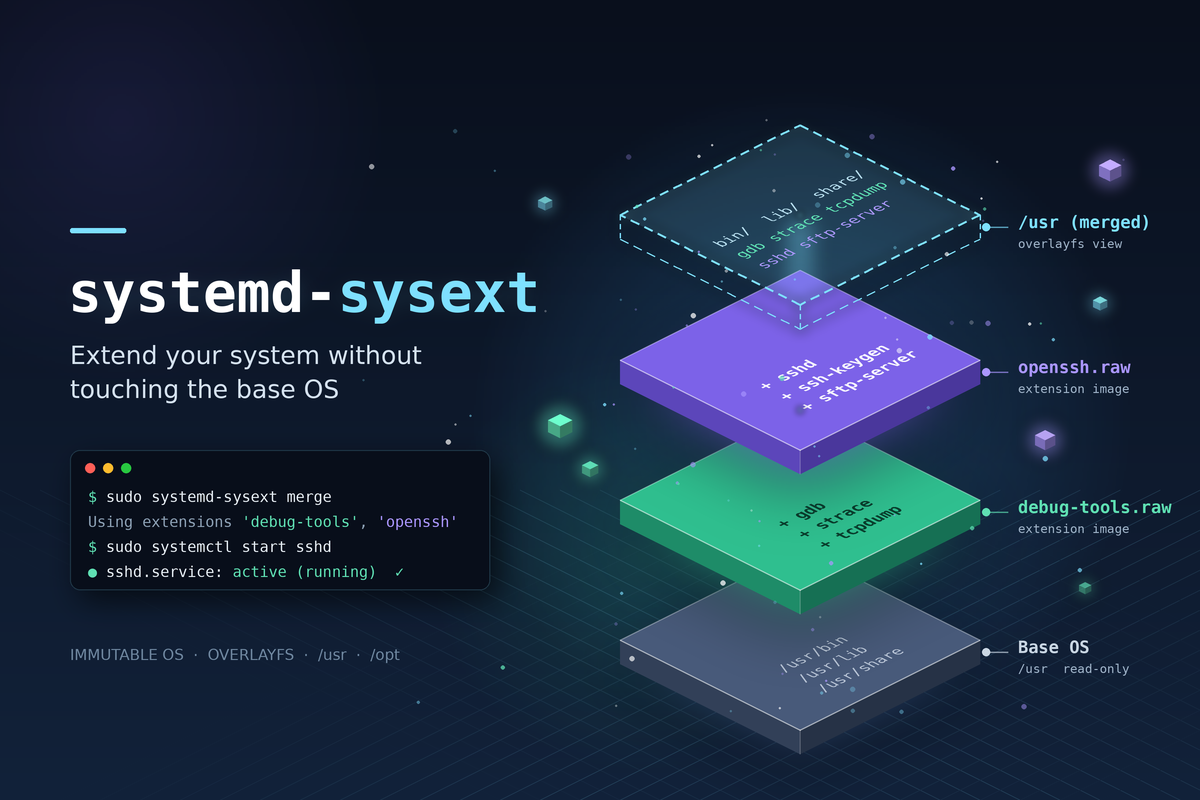
systemd-sysext (System Extensions) mounts an OverlayFS on top of /usr
(and /opt). Extension images add content without modifying the base system.
Resulting view of /usr after merge:
┌─────────────────────────────────┐
│  Upper Layer: ssh-server        │  ← /var/lib/extensions/ssh-server.sysext.raw
│  (optional additional sysexts)  │
├─────────────────────────────────┤
│  Lower Layer: Base OS           │  ← unchanged /usr
└─────────────────────────────────┘
systemd-sysext refreshsysext provides no isolation: extension content behaves exactly like natively installed software. For debug tooling, that is the goal. For sandboxed services, use Portable Services instead.
sysext is mainstream on image-based distributions: Flatcar ships Docker and Kubernetes components as sysexts, and Fedora CoreOS, GNOME OS and KDE Linux use it as well. On classic distributions it is a niche tool for development and debugging.
By default, /usr becomes read-only while an extension is merged, even on a
mutable host, so apt or dnf updates fail until it is unmerged. Since
systemd 256, the --mutable= option controls this:
| Mode | Behavior |
|---|---|
no (default) | Merged hierarchy is read-only |
yes | Writes go to /var/lib/extensions.mutable/usr/ and persist |
ephemeral | Writes go to an empty temporary directory and are lost on unmerge |
auto | Mutable only if /var/lib/extensions.mutable/usr/ exists |
sudo systemd-sysext refresh --mutable=ephemeral
Writes do not reach the base /usr, but land in a separate layer. A package
update performed while merged is lost on unmerge (ephemeral) or only visible
while merged (yes). To route writes back to the real /usr, make the write
directory a symlink: /var/lib/extensions.mutable/usr → /usr.
For the boot-time service, set the mode persistently in sysext.conf
(systemd 259 and later):
# /etc/systemd/sysext.conf.d/60-mutable.conf
[SysExt]
Mutable=auto
The examples use Ubuntu with systemd 259 (≥ 255 recommended). The extension is built on a build host running the same release as the target. For a first test, both can be the same machine.
All extension content must live under usr/ (or opt/). Anything else is
ignored. A metadata file named after the extension is required:
ssh-server/
└── usr/
    ├── lib/extension-release.d/extension-release.ssh-server   ← required
    ├── lib/systemd/system/ssh.service
    └── sbin/sshd
Download the package and extract it, without installing it:
WORKDIR="$(pwd)/myextensions"
EXTNAME="ssh-server"
EXTDIR="${WORKDIR}/${EXTNAME}"
mkdir -p "${EXTDIR}" && cd "${WORKDIR}"

apt-get download openssh-server
dpkg-deb -x openssh-server_*.deb "${EXTDIR}"

# /etc is ignored by sysext: keep it aside for the target configuration
mv "${EXTDIR}/etc" "${WORKDIR}/ssh-etc"
rm -rf "${EXTDIR}/usr/share/doc" "${EXTDIR}/usr/share/man"
dpkg-deb -x does not resolve dependencies. On a minimal base image, extract
missing packages (for example openssh-client) into the same tree, always from
the same distribution release as the target.
. /etc/os-release
mkdir -p "${EXTDIR}/usr/lib/extension-release.d"
cat > "${EXTDIR}/usr/lib/extension-release.d/extension-release.${EXTNAME}" << EOF
ID=${ID}
VERSION_ID=${VERSION_ID}
EXTENSION_RELOAD_MANAGER=1
EOF

# Ship the enablement in the extension instead of running systemctl enable
mkdir -p "${EXTDIR}/usr/lib/systemd/system/multi-user.target.wants"
ln -sf ../ssh.service "${EXTDIR}/usr/lib/systemd/system/multi-user.target.wants/"

sudo chown -R root:root "${EXTDIR}"
systemd rejects the extension if ID and VERSION_ID do not match the target's
/etc/os-release (ID=_any skips the check for quick experiments).
EXTENSION_RELOAD_MANAGER=1 reloads systemd after merging so the new units are
picked up.
/run/extensions/ lives in RAM and is cleared on reboot:
sudo mkdir -p /run/extensions
sudo cp -a "${EXTDIR}" /run/extensions/
sudo systemd-sysext merge
systemd-sysext status     # /usr  ssh-server  <timestamp>
which sshd                # /usr/sbin/sshd
Package maintainer scripts are not executed, so the /etc state they would
create has to be set up on the target. This only touches mutable /etc, never
/usr:
sudo systemd-sysusers                      # creates the sshd user
sudo install -D -m 644 /usr/share/openssh/sshd_config /etc/ssh/sshd_config
sudo install -D -m 644 "${WORKDIR}/ssh-etc/pam.d/sshd" /etc/pam.d/sshd
sudo ssh-keygen -A                         # host keys
sudo systemctl start ssh.service
This separation is intentional: sysext delivers software, configuration stays with the operator. To ship configuration as an artifact too, there are two options:
/etc the same way sysext overlays /usr. Use it
when configuration should be versioned independently.usr/lib/systemd/system/ssh.service.d/ inside the
sysext, pointing sshd -f to a config file under /usr. Use it when software
and defaults belong together.A minimal drop-in example, added to the extension tree before building the image:
CONF=/usr/lib/openssh/sshd_config.sysext
sudo tee "${EXTDIR}${CONF}" >/dev/null << 'EOF'
PermitRootLogin no
PasswordAuthentication no
UsePAM yes
EOF

sudo mkdir -p "${EXTDIR}/usr/lib/systemd/system/ssh.service.d"
sudo tee "${EXTDIR}/usr/lib/systemd/system/ssh.service.d/10-sysext.conf" >/dev/null << EOF
[Service]
ExecStartPre=
ExecStartPre=/usr/sbin/sshd -t -f ${CONF}
ExecStart=
ExecStart=/usr/sbin/sshd -D -f ${CONF} \$SSHD_OPTS
ExecReload=
ExecReload=/usr/sbin/sshd -t -f ${CONF}
ExecReload=/bin/kill -HUP \$MAINPID
EOF
The empty ExecStartPre=, ExecStart= and ExecReload= lines reset the
commands of Ubuntu's ssh.service, so both the config check and the daemon use
the shipped config. /etc/ssh/sshd_config is then no longer needed. Host keys,
the sshd user and the PAM configuration remain in /etc.
For production, build a read-only EROFS image (Squashfs works too). Since
systemd 255, .sysext.raw is the recommended suffix:
sudo mkfs.erofs -zlz4hc "${WORKDIR}/${EXTNAME}.sysext.raw" "${EXTDIR}" # ~1.3 MB
Install it persistently on the target and remove the test copy, which would otherwise take precedence:
sudo mkdir -p /var/lib/extensions
sudo cp "${WORKDIR}/${EXTNAME}.sysext.raw" /var/lib/extensions/
sudo rm -rf "/run/extensions/${EXTNAME}"
sudo systemd-sysext refresh
sudo systemctl enable systemd-sysext.service    # not enabled by default on Ubuntu
systemd-sysext.service merges extensions before basic.target, so binaries and
units are available when regular services start, but not in the initrd.
On a verity-protected host, extensions should be protected the same way:
systemd-repart --make-ddi=sysext or mkosi
build signed images, and --image-policy= enforces that only signed extensions
are accepted.
sudo systemctl stop ssh.service
sudo rm /var/lib/extensions/ssh-server.sysext.raw
sudo systemd-sysext refresh
which sshd    # → no output
refresh only removes the deleted extension, others stay active. No package
cleanup, no leftovers in /usr. Only the host state in /etc (keys, config,
sshd user) remains.
systemd-sysext list                                      # found extensions
sudo SYSTEMD_LOG_LEVEL=debug systemd-sysext refresh      # why was it rejected?
sudo systemd-dissect /var/lib/extensions/ssh-server.sysext.raw   # image metadata
Typical causes: ID/VERSION_ID do not match /etc/os-release, the metadata
filename does not match the extension name, or the kernel lacks EROFS/Squashfs
support. If ssh.service fails, check for a missing sshd user, config or host keys.
systemd-sysext delivers software into immutable systems without touching the
release image:
refresh roll back the change./usr via sysext, configuration in /etc or a confext./var/lib/extensions.The SSH example demonstrates the principle. The same technique applies to monitoring agents, VPN clients, debuggers or custom CLI tools.
man systemd-sysext, man systemd-confext, man systemd-dissectA short explainer why sandboxing might be required for you and a guide how to choose the actual sandbox.
Do you like reading tests? No? Maybe you haven't seen readable tests yet.
AI built it fast. The rest was catching where it sounded right but wasn't.